Executive Summary
I built a virtualized Active Directory environment to simulate enterprise network attacks and defenses. The goal was to practice log analysis, GPO configuration, and malware containment in a safe sandbox.
Tools Used
- Hypervisor: VMware Workstation Pro / VirtualBox
- OS: Windows Server 2019, Windows 11 Home, Kali Linux
- Security Tools: Splunk (SIEM), PfSense (Firewall)
The Setup
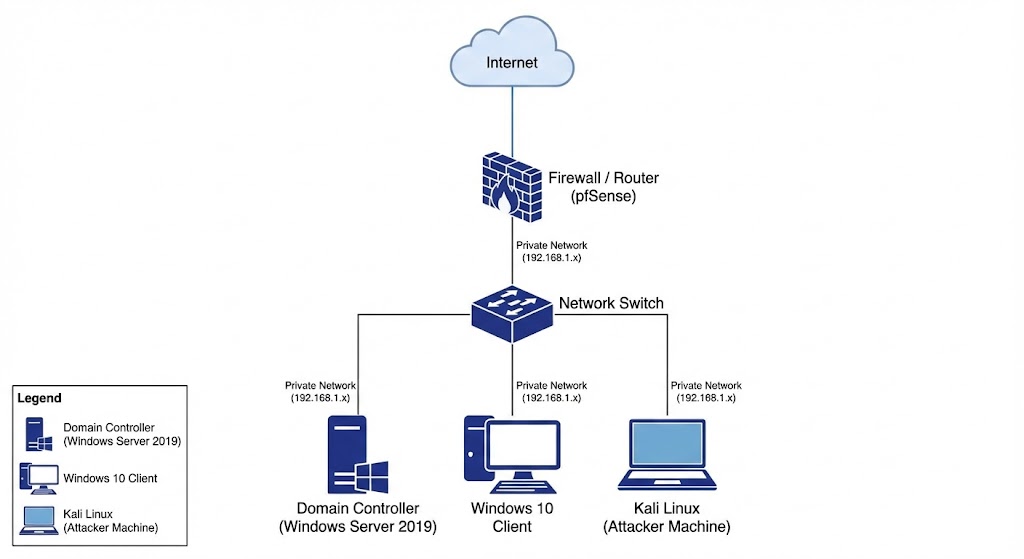
I configured a Domain Controller (DC) and two client machines. I implemented the following security controls:
- Least Privilege: Created separate admin and user accounts.
- Audit Logging: Enabled advanced audit policies to track logon events (Event ID 4624).
Network Diagram
Challenges & Solutions
Challenge: I initially couldn’t get the Windows 10 client to join the domain due to DNS resolution errors. Solution: I realized my client was using the router’s DNS (8.8.8.8) instead of my Domain Controller’s static IP. I manually configured the DNS settings on the client adapter to point to the DC.
What I Learned
This project taught me the importance of proper DNS configuration in an Active Directory environment. I also gained hands-on experience reading Windows Event Logs to identify failed login attempts (Brute Force simulation).